
Google Business Profile for Restaurants: How to Rank in 'Restaurants Near Me' in Raipur, Bhilai & Bilaspur
 RestroKhata Team
Quick answer: To rank in "restaurants near me" searches, claim and verify your Google Business Profile, use your real name and the most specific category, set the exact map pin, keep hours and menu updated, add real photos, and collect genuine reviews every week — and reply to all of them.
When someone in Raipur searches "cafe near me", "veg thali near me" or "family restaurant on VIP Road", the map results at the top decide where most of them go. Those results come from Google Business Profile (earlier called Google My Business), not from your website alone.
The good news: a well-maintained profile costs nothing and a small local restaurant can outrank a bigger one nearby by simply being more complete, more accurate and more active.
How Google Decides Which Restaurants to Show
Google says local results are based mainly on three things:
- Relevance — how well your profile matches the search ("biryani", "pure veg restaurant", "rooftop cafe").
- Distance — how close you are to the person searching or the area they mention.
- Prominence — how well known you are, including review count, rating and activity.
You can't change distance, but you can improve relevance and prominence a lot. Everything below works on those two.
Step-by-Step Setup Checklist
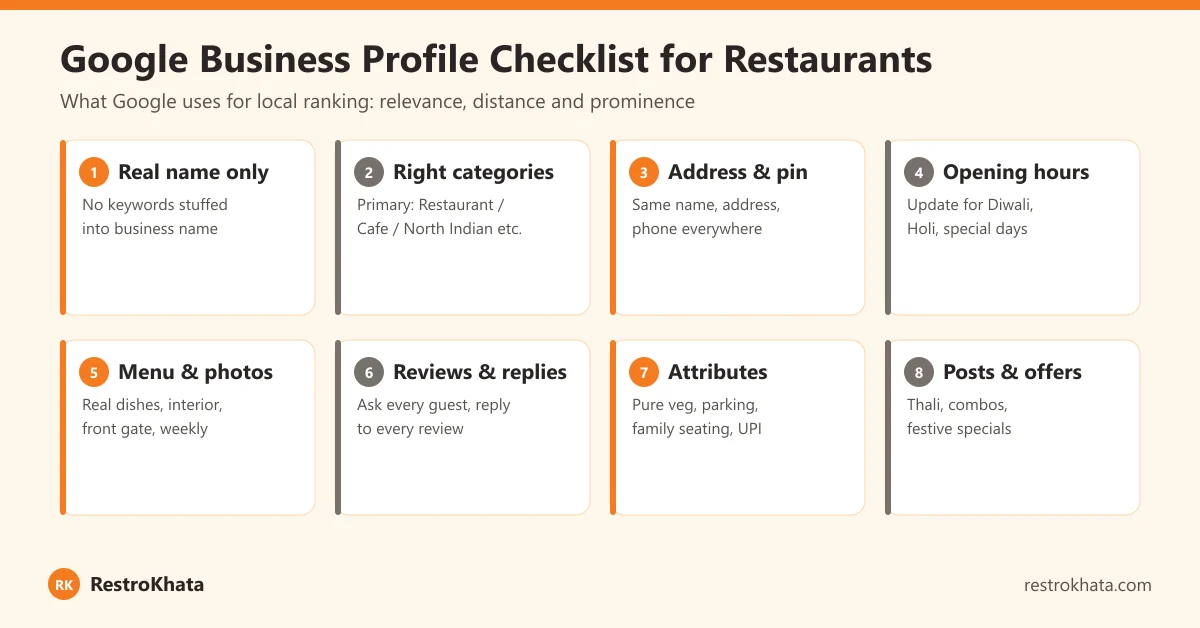
1. Claim and verify your profile
Search for your restaurant on Google Maps. If it already exists (customers often create it), claim it; if not, create it from Google Business Profile. Complete verification — Google may ask for a short video of your signboard, counter and kitchen, so do it during opening hours.
2. Use your real business name — nothing extra
The name must match your signboard exactly. "Sharma Bhojnalaya" is correct; "Sharma Bhojnalaya – Best Thali Restaurant in Raipur" is against Google's guidelines and is one of the most common reasons profiles get suspended.
3. Choose the most specific primary category
Your primary category has a big effect on which searches you appear in. Choose the closest match — for example "North Indian restaurant", "Vegetarian restaurant", "Cafe", "Fast food restaurant" or "Biryani restaurant" — and add a few accurate secondary categories. Don't add categories for things you don't serve.
4. Exact address and map pin
Drag the pin to your actual entrance. In busy areas like Pandri, Telibandha or Shankar Nagar in Raipur, Supela or Nehru Nagar in Bhilai, and Link Road in Bilaspur, a pin that is 100 metres off can send customers to the wrong lane. Mention a well-known landmark in your description to help people find you.
5. Keep name, address and phone the same everywhere
Your name, address and phone number should be identical on Google, Zomato, Swiggy, Justdial, Instagram, Facebook and your website. Inconsistent details confuse both customers and Google.
6. Opening hours — including festival days
Wrong hours lead to angry reviews. Update special hours for Diwali, Holi, Navratri, Rajyotsava and any day you close early or stay open late. A profile with accurate hours is shown with more confidence.
7. Menu and photos
Add your menu with prices, and upload real photos: the front of your outlet (so people recognise it from the road), seating, your best-selling dishes and your team. Avoid stock photos. Add new photos whenever you launch a dish or update interiors.
8. Attributes and description
Fill in every attribute that is true for you — dine-in, takeaway, delivery, family seating, parking, outdoor seating, vegetarian options, and payment options. Write a natural description (Google allows up to 750 characters) that mentions your cuisine, signature dishes and area — written for people, not stuffed with keywords.
9. Posts and offers
Post weekly updates — a new thali, a combo for office lunch, a festival special. Posts keep your profile active and give searchers a reason to choose you today.
Reviews: The Biggest Lever You Control
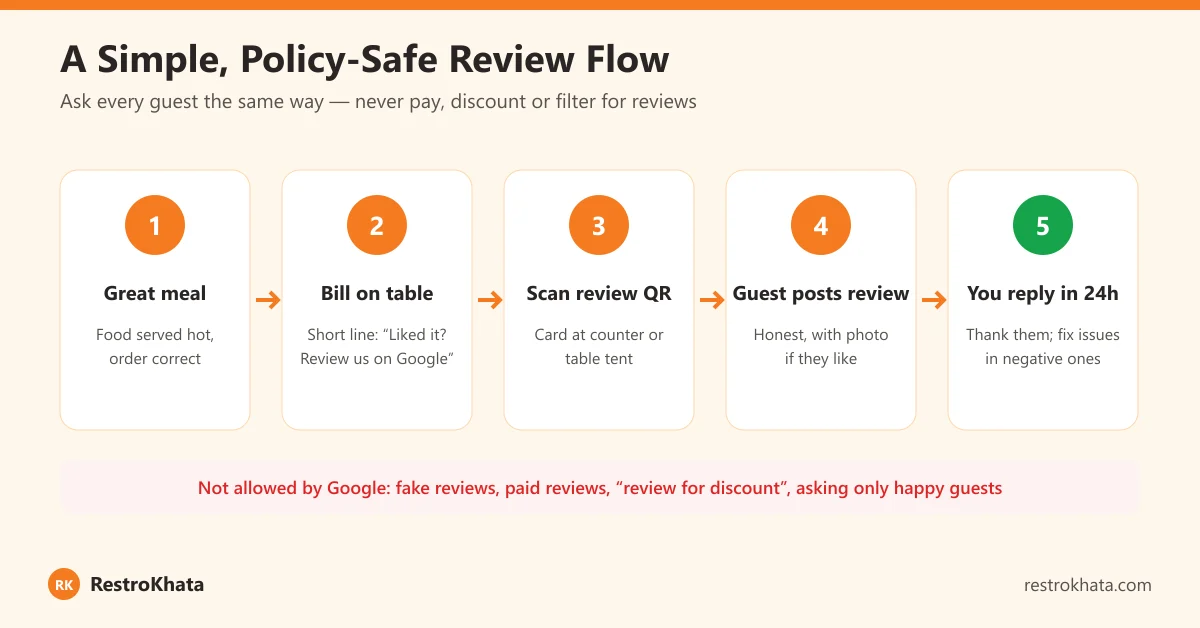
Review count, rating and recency all matter. The restaurants with the most reviews are usually not the ones with the best food — they are the ones that ask, consistently.
- Get your review link from your Google Business Profile and turn it into a QR code for a small card at the counter or a table tent.
- Ask at the right moment — when the bill is presented after a good meal. Train staff to say one simple line.
- Use your bill footer. A line like "Enjoyed your meal? Please review us on Google" on every invoice is a quiet, consistent reminder. In RestroKhata you can set a custom receipt footer from settings.
- Reply to every review within a day — thank people by name, and for complaints, apologise, address the specific issue and say what you changed.
Good Reviews Start Inside the Restaurant
Most negative restaurant reviews are about the same few things: wrong or missing items, long waits, slow billing and disputes over the bill. Fix those and your rating improves on its own.
- Accurate orders: with QR self-ordering and KOTs sent straight to the kitchen, there is less room for a dish to get lost between the waiter and the chef. See how to reduce order mistakes.
- Visible order status: customers who order by QR can track their order from Placed to Ready, which reduces "where is my food?" frustration.
- Fast, clear bills: a printed GST invoice with item-wise tax and a UPI QR avoids arguments at the table. Our GST billing guide explains what a proper bill should show.
- Up-to-date menu: a digital QR menu lets you mark items unavailable instantly, so guests don't order something you can't serve.
Mistakes That Get Restaurant Profiles Suspended or Ignored
- Keywords or city names added to the business name
- Two profiles for the same outlet (for example one old, one new)
- Using a home address or virtual address where customers can't visit
- Fake, paid or incentivised reviews
- Wrong hours and phone numbers that nobody answers
- Copy-pasted stock photos instead of real ones
Track What's Working
Google Business Profile shows you how many people viewed your profile, called you, asked for directions or clicked through to your website or menu. Check it monthly. If calls and direction requests grow after you add photos or posts, keep doing more of that.
Opening a new outlet? Add Google Business Profile to your launch plan — see our restaurant opening checklist for Chhattisgarh.
Conclusion
Ranking in "restaurants near me" is not about tricks. It is about a complete, honest and active Google Business Profile, backed by a restaurant that serves orders correctly and quickly. Set up your profile properly once, add photos and posts every week, ask every guest for a review, and reply to every one. In a few months, that consistency shows up as more calls, more direction requests and more full tables.
Frequently Asked Questions
How do I get my restaurant to show up in 'restaurants near me' on Google?
Create and verify a Google Business Profile, choose the most specific primary category, set the exact map pin, keep hours updated, add real photos and your menu, and collect genuine reviews regularly. Google ranks local results based on relevance, distance and prominence.
Can I add keywords like 'Best Restaurant in Raipur' to my business name on Google?
No. Your Google Business Profile name must match the real name on your signboard. Adding keywords or locations to the name goes against Google's guidelines and can lead to the profile being suspended. Use the description, menu and posts to mention your cuisine and area naturally.
Is it allowed to give a discount in exchange for a Google review?
No. Google does not allow offering incentives such as discounts, free items or payment for reviews, and it does not allow asking only happy customers for reviews. Ask every guest the same way and let them write honestly.
How many photos should a restaurant upload on Google Business Profile?
There is no fixed number, but cover your exterior and entrance, interior seating, your popular dishes and your menu. Add fresh photos regularly, especially when you launch new dishes, so the profile looks active and accurate.
Should I reply to negative Google reviews?
Yes. Reply politely and quickly, thank the guest, address the specific issue and explain what you are fixing. Future customers read your replies, and a calm, helpful response often matters more than the review itself.
Better service, better reviews
Fewer order mistakes, faster bills and a professional GST invoice with your own footer message — RestroKhata helps you deliver the experience that earns 5-star reviews.
Start Free Trial →