
How to Stop Billing Leakage & Staff Theft in Your Restaurant: 9 POS Controls Every Owner Needs
 RestroKhata Team
Quick answer: Restaurant billing leakage happens when food is served but not billed, bills are changed after payment, discounts are given without approval, or cash is not recorded. You stop it by making every order go through the POS, giving role-based logins to staff, printing a UPI QR to the owner's account on every bill, and doing a 10-minute closing check every night.
Most owners discover leakage late — when the month's profit doesn't match the crowd they saw every evening. It is especially common in outlets where the owner cannot be at the counter all day: a second outlet, a family-run dhaba where the owner also handles purchases, or a cafe that runs late into the night.
Not all leakage is theft. A forgotten parcel bill, a discount typed wrongly or a cancelled order that was actually served all cost the same. The fix for both is the same too: a simple system that records everything and makes gaps visible.
Warning Signs to Watch For
- Cash in the drawer is regularly short (or mysteriously over) at closing
- Food cost percentage is rising, while sales stay the same
- The kitchen prepared more orders than the number of bills
- Many parcel or takeaway orders, but very few takeaway bills
- Customers mention they paid but didn't get a printed bill
- Discounts and "complimentary" items appear on busy nights, with no clear reason
- Expense entries for purchases without a supplier bill
If two or more of these sound familiar, the controls below are worth putting in place this week. If your food cost is the concern, also read our food cost calculation guide.
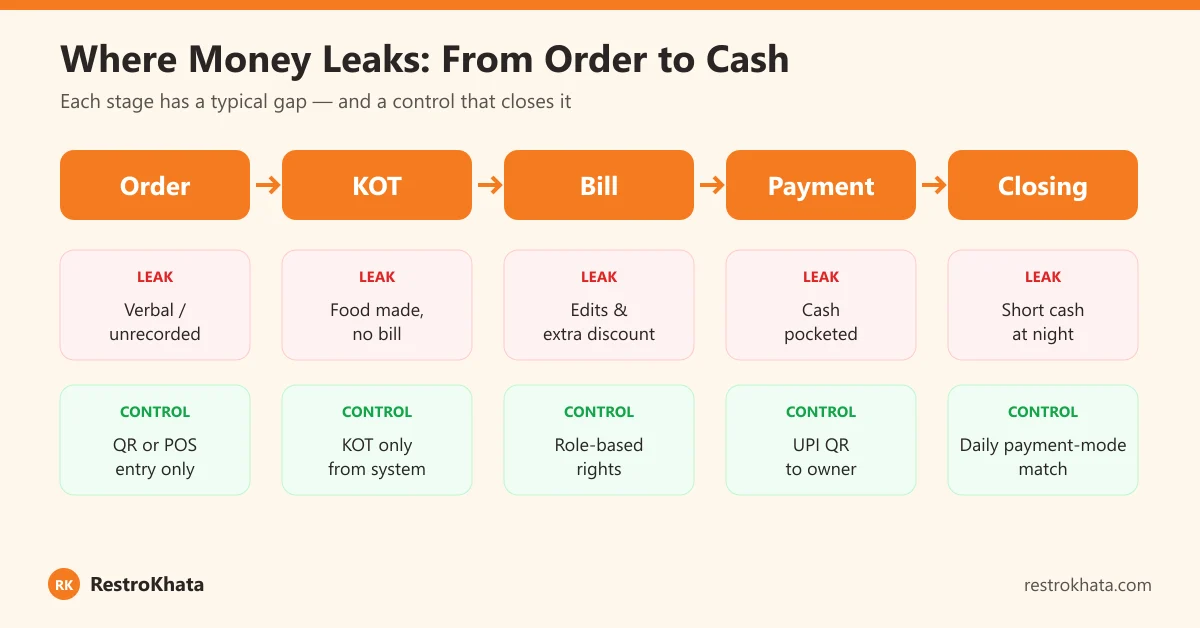
Where Money Leaks: From Order to Cash
| Stage | Typical leak | Control |
|---|---|---|
| Order | Verbal orders, nothing recorded | Every order via QR or POS |
| KOT | Food prepared from a slip, no bill made | Kitchen cooks only from system KOT/KDS |
| Bill | Edits, deletions, extra discounts | Role-based rights, discount rules |
| Payment | Cash pocketed, QR swapped | UPI QR on bill to owner's account |
| Closing | Short cash explained away | Daily match by payment mode |
9 POS Controls That Close the Gaps
1. No order without a system entry
Every order — dine-in, takeaway or walk-in — must be entered in the POS or placed by the customer through the table QR menu. When customers order through QR, the order is recorded at the source, before any staff member touches it. RestroKhata supports dine-in, takeaway token and walk-in direct billing, so there is no "quick order" that skips the system.
2. The kitchen cooks only from a system KOT or KDS
Make this the single most important rule: if it isn't on the kitchen display or the printed KOT, it doesn't get cooked. Handwritten slips and verbal shouts to the kitchen are where unbilled food begins. Because the KOT comes from the same system as the bill, every plate that leaves the kitchen has a bill behind it.
3. Separate login for every staff member
Shared passwords make it impossible to know who did what. Give each person their own login. In RestroKhata, the owner, manager, waiter and kitchen roles each see only what they need — waiters create orders, request bills and view tables; kitchen staff see the live queue; settings and reports stay with the owner.
4. Clear rules for discounts, cancellations and complimentary items
Write down who can give a discount, up to how much, and who approves a cancelled or complimentary item. Review every discount and cancellation in the daily closing. When you evaluate any POS, check how it restricts these actions by role and what it records.
5. UPI QR on every bill, pointing to the owner's account
A common trick at shops is replacing the counter QR sticker with someone else's. When the UPI QR is printed on the bill itself, using the UPI ID you set in settings, the customer pays straight into your account for that exact bill. RestroKhata prints a UPI QR automatically on every bill. Still, check any QR stands and stickers at the counter once a week.
6. Keep financial reports owner-only
If staff can see the day's totals, they also know how much can "disappear" without notice. Revenue, tax and expense reports in RestroKhata are visible only to the owner.
7. Match cash and UPI against the report every night
Your sales report split by payment type is the starting point: expected cash = opening float + cash sales; expected UPI = UPI sales, which should match the credits in your bank app. Any difference is discussed the same night, not at month-end.
8. Log every expense with a category and a bill
Petty cash purchases are another quiet leak. Log every expense — vegetables, gas, repairs — with a category, and keep the supplier bill or a photo. RestroKhata's expense logging by category makes month-end totals and unusual spikes easy to spot.
9. Check from your phone, not only at the counter
When the dashboard updates in real time, you can look at orders and sales from home or another outlet. Staff who know the owner can see live numbers are far less tempted to bend the rules.
The 10-Minute Daily Closing Routine
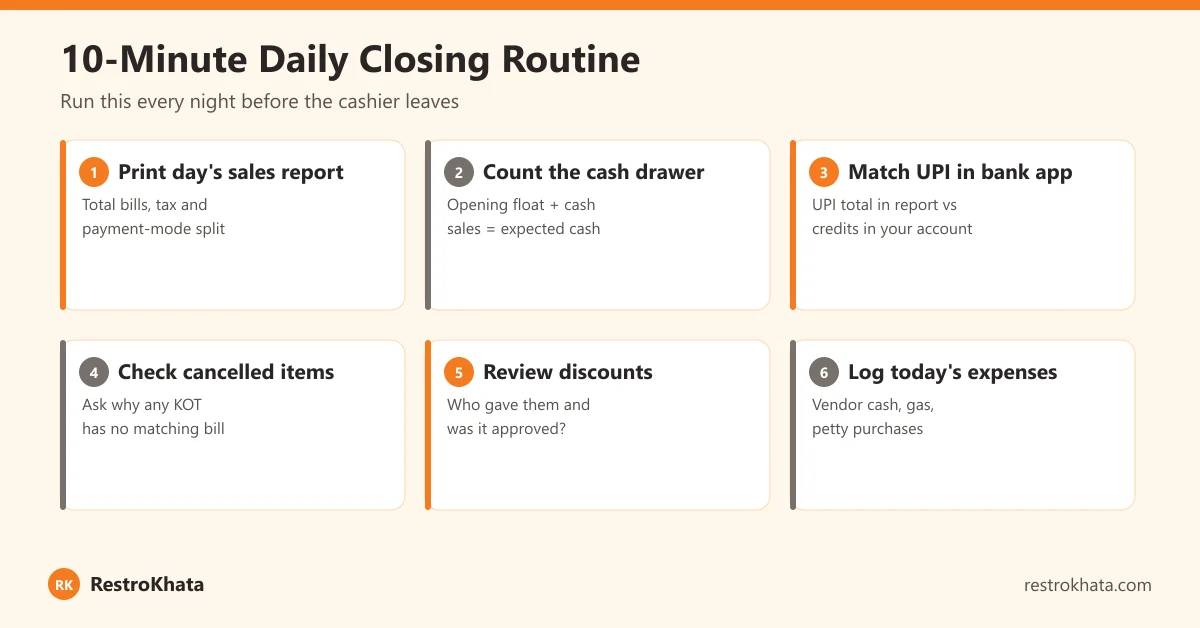
- Pull the day's sales report — total bills, tax, and the split by payment mode.
- Count the cash drawer — opening float plus cash sales should equal cash in hand.
- Match UPI — compare the UPI total with credits in your bank app.
- Check cancelled or voided items — every one should have a reason.
- Review discounts — who gave them, and were they within your rules?
- Log the day's expenses — with category and supplier bill.
Do this consistently for two weeks and you will know your normal numbers. After that, anything unusual stands out immediately.
How to Introduce Controls Without Upsetting Your Team
- Explain the why: clear records protect honest staff — no one is blamed for a shortage without data.
- Apply rules to everyone, including managers and family members who work at the counter.
- Train before you enforce: run a week where mistakes are corrected, not punished.
- Reward accuracy: recognise the shift with clean closings, not just high sales.
Fewer manual steps also mean fewer honest mistakes. Our guide on reducing order mistakes covers the kitchen side, and our GST billing guide explains why every bill should be a proper tax invoice.
Conclusion
Billing leakage rarely shows up as one big loss. It is ₹200 here and ₹500 there, every day, across months. Put every order through the system, let the kitchen cook only from system KOTs, give staff their own role-based logins, send payments straight to your account with a UPI QR on the bill, and close the day with a 10-minute check. These habits cost almost nothing and they are the fastest way to see your real profit.
Frequently Asked Questions
What is billing leakage in a restaurant?
Billing leakage is revenue you earned but never received — food that was served but not billed, bills that were edited or deleted after payment, unapproved discounts, or cash that was collected but not recorded. It can come from mistakes as well as theft.
How do I know if my restaurant has billing leakage?
Common signs are cash that is regularly short at closing, food cost rising while sales stay flat, more KOTs than bills, many parcel orders but few parcel bills, and customers saying they paid but did not receive a bill.
How does a POS system prevent staff theft?
A POS system makes every order go through the system, links kitchen tickets to bills, gives each staff member a separate login with limited rights, and keeps financial reports visible only to the owner. A UPI QR printed on every bill sends payment straight to the owner's account.
Is UPI safer than cash for restaurants?
UPI reduces cash handling, and when the UPI QR is printed on the bill with the owner's UPI ID, the payment goes directly to the owner's account. Still check counter QR stickers regularly, because QR codes can be swapped, and match UPI totals with your bank app daily.
Will strict controls upset my honest staff?
Clear systems usually protect honest staff, because when cash is short nobody is blamed without evidence. Explain the rules on day one, apply them to everyone including managers, and focus daily checks on numbers rather than people.
Put every order, bill and payment on record
RestroKhata gives each staff member their own role-based login, prints a UPI QR on every bill, and keeps revenue reports owner-only — check your outlet from your phone.
Start Free Trial →