
Thermal Printer Setup for Restaurant POS: Complete Guide for Cafes & Restaurants in Chhattisgarh
 RestroKhata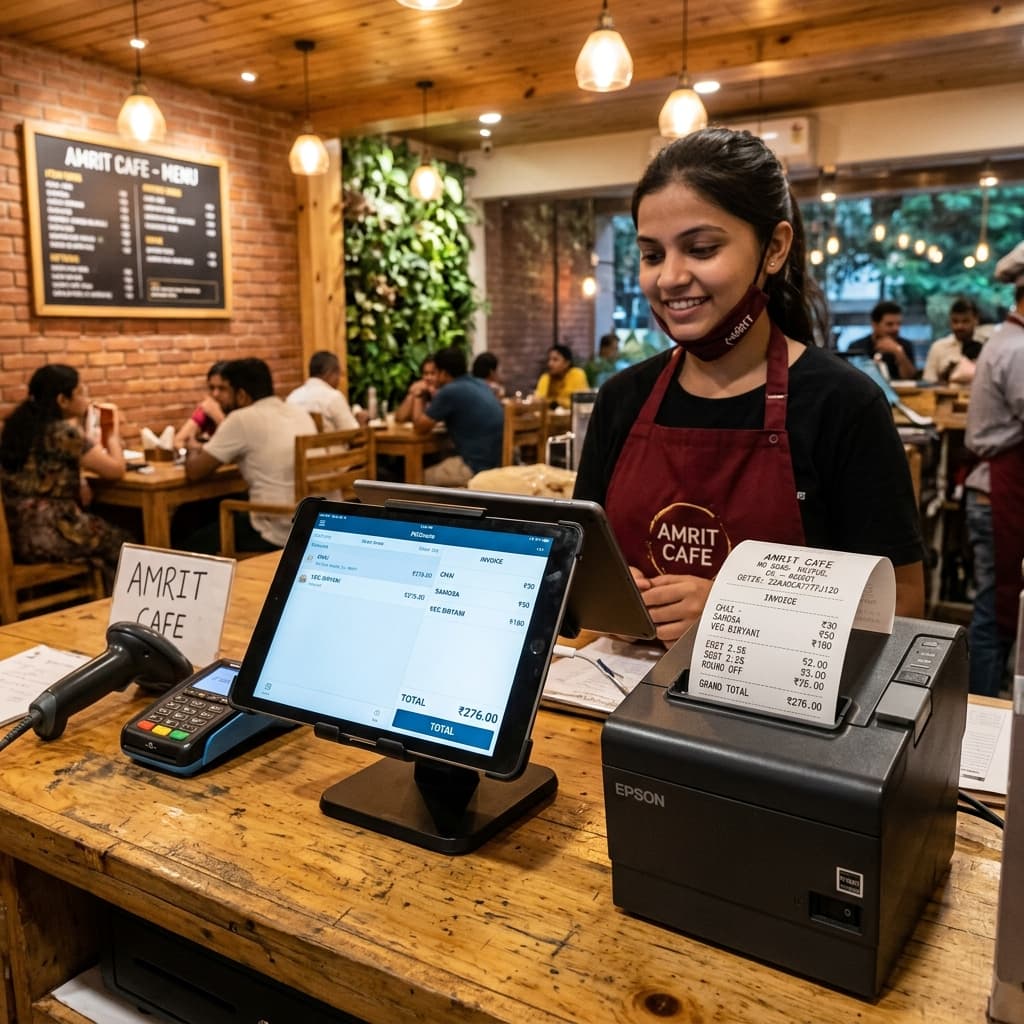
A properly configured thermal printer prints GST bills and KOT slips in under 3 seconds.
Reading Time: 6 minutes | Level: Beginner–Intermediate | For: Cafe Owners, Restaurant Managers, Dhaba Operators in Chhattisgarh
Quick Answer (AEO Featured Snippet)
How do I set up a thermal printer for my restaurant POS in Chhattisgarh?
Connect your thermal printer via USB, LAN, or WiFi → install the printer driver → set paper size (58mm or 80mm) → print a test receipt → link with your restaurant POS software like RestroKhata. The entire setup takes under 15 minutes and eliminates billing delays, duplicate KOT slips, and manual errors.
Why This Guide Is For You
Running a cafe in Raipur? Managing a restaurant in Bhilai or Durg? You already know the chaos — waiters shouting orders to the kitchen, customers waiting for a bill, handwritten receipts full of errors.
A properly configured thermal printer connected to your restaurant POS solves all of this. This guide covers everything a small or mid-size restaurant owner in Chhattisgarh needs — from choosing the right printer to connecting it with billing software — in plain, simple language.
What Is a Thermal Printer? (And Why Restaurants Use It)
A thermal printer prints receipts using heat instead of ink. There are no cartridges to replace, no ribbons to change. Just paper rolls and fast, clean printing.
Why restaurants in Chhattisgarh prefer thermal printers:
- Prints a full GST bill in under 3 seconds
- No ink cost — only paper rolls needed
- Runs quietly — no noise in the dining area
- Works in high-temperature kitchen environments
- Lasts 3–5 years with minimal maintenance
RestroKhata Insight: Most small cafes and dhabas in cities like Raipur and Korba start with a single USB thermal printer. As they grow to multiple tables or billing counters, they upgrade to LAN or WiFi models.
Types of Thermal Printers: Which One Is Right for Your Restaurant?
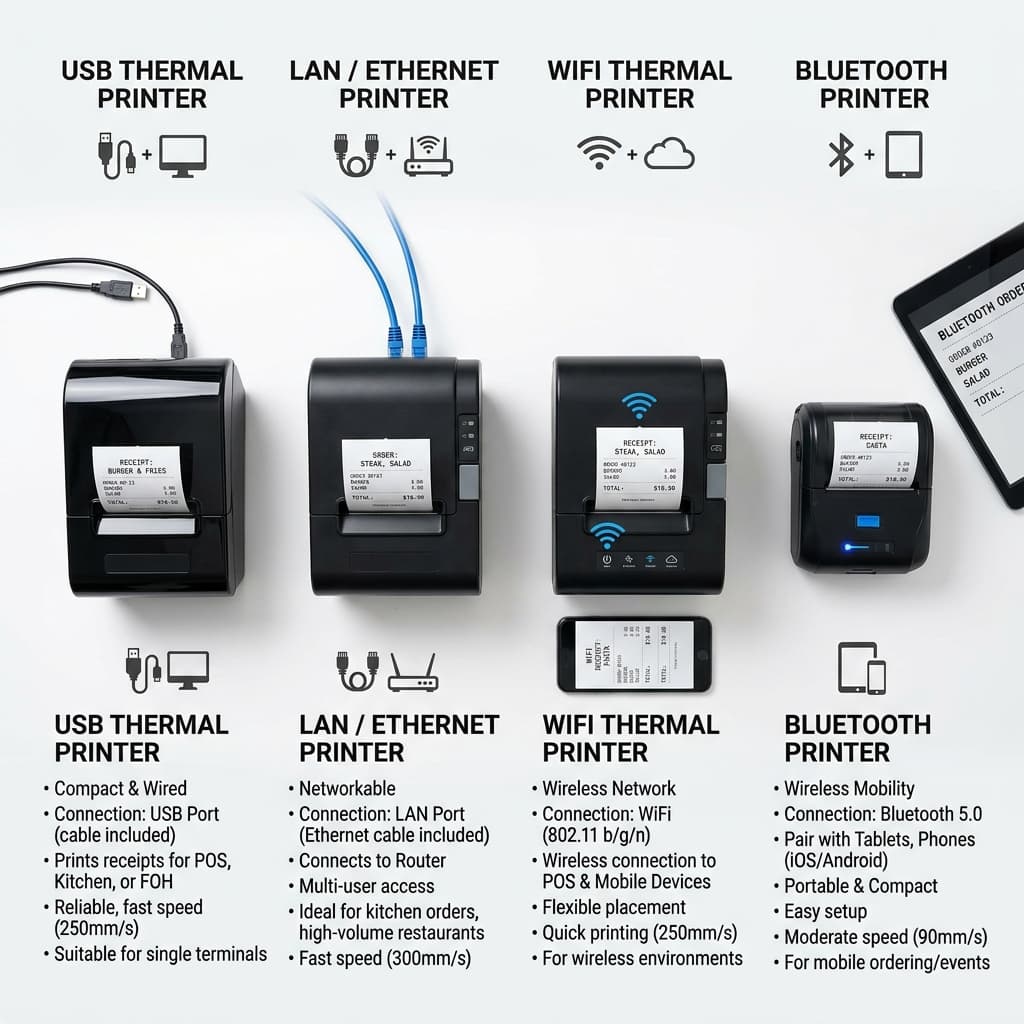
USB printers suit small cafes. LAN and WiFi printers are ideal for multi-table restaurants.
1. USB Thermal Printer
Price Range: ₹1,800 – ₹4,500
Best for:
- Small cafes with 1 billing counter
- Takeaway counters
- Tiffin centers and snack shops
Limitation: Only one device can print at a time.
2. LAN / Ethernet Thermal Printer
Price Range: ₹4,000 – ₹9,000
Best for:
- Restaurants with 10–50 tables
- Multi-counter restaurants (separate billing + kitchen counter)
- Cloud kitchens with multiple screens
Advantage: Multiple devices (tablets, computers, phones) can send print jobs simultaneously.
3. WiFi Thermal Printer
Price Range: ₹4,500 – ₹10,000
Best for:
- Restaurants using tablet-based POS
- Outlets with no LAN infrastructure
- Quick service restaurants (QSRs)
Advantage: No cable management, flexible placement.
4. Bluetooth Thermal Printer
Price Range: ₹1,500 – ₹3,500
Best for:
- Mobile billing at food stalls
- Street food counters
- Small cafes using Android POS apps
Limitation: Range-limited; not suitable for large restaurant floors.
Printer Type Comparison Table
| Feature | USB | LAN | WiFi | Bluetooth |
|---|---|---|---|---|
| Price | Low | Medium | Medium | Low |
| Multi-device support | ❌ | ✅ | ✅ | Limited |
| Best for | Small cafe | Restaurant | Tablet POS | Mobile/stall |
| Setup difficulty | Easy | Easy | Medium | Easy |
| Recommended for Chhattisgarh | Startup phase | Growth phase | Growth phase | Food stalls |
Common Problems Restaurant Owners Face (And How This Guide Fixes Them)
These are the most common complaints from restaurant owners across Raipur, Bhilai, Durg, and Jagdalpur:
| Problem | Cause | Fix (Covered Below) |
|---|---|---|
| Printer not detected | Wrong driver or port | Step 2: Install correct driver |
| KOT not reaching kitchen | Printer not mapped in POS | Step 5: Configure in RestroKhata |
| Paper jam | Incorrect paper roll size | Step 3: Set correct paper width |
| Duplicate bills printing | Network misconfiguration | Step 5: Assign static IP |
| Slow bill generation | Printer on wrong port | Step 1: Re-connect and verify |
| Bill format looks wrong | Paper size not configured | Step 3: Set 80mm in POS settings |
Step-by-Step Thermal Printer Setup for Restaurant POS
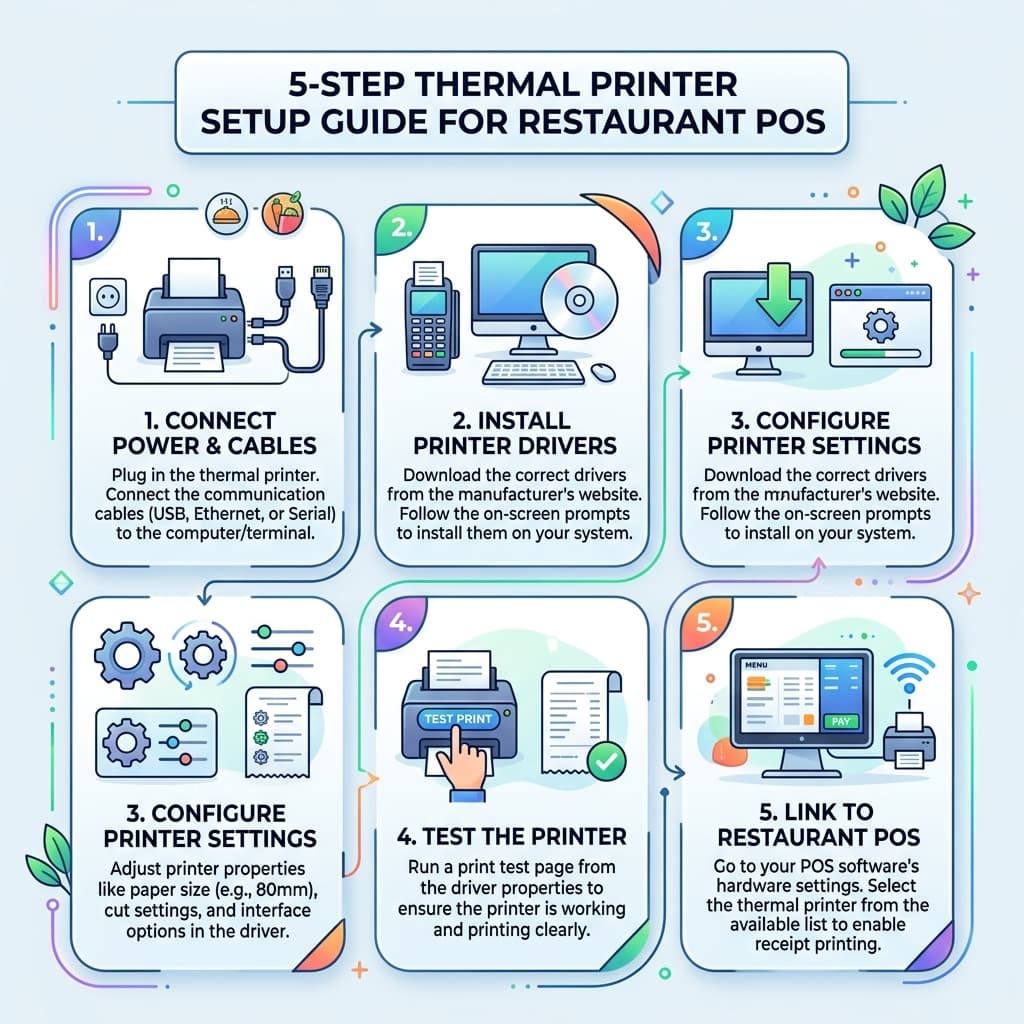
Complete thermal printer setup takes under 15 minutes when you follow these 5 steps.
Step 1: Connect the Printer to Your System
For USB:
- Plug the printer's USB cable into your billing computer or laptop
- Windows will detect it automatically in most cases
- Check Device Manager to confirm detection
For LAN:
- Connect printer to your router using a LAN cable
- Note the IP address shown on the printer's self-test print
- Use this IP to configure the printer in your POS software
For WiFi:
- Press the WiFi button on the printer (or use the config utility)
- Connect to your restaurant's WiFi network
- Note the assigned IP address from your router settings
For Bluetooth:
- Turn on Bluetooth on your phone/tablet
- Press the Bluetooth pairing button on the printer
- Pair the device in Android/iOS Bluetooth settings
Step 2: Install the Printer Driver
Important: Always download drivers from the official manufacturer website. Common brands used in Chhattisgarh restaurants: Epson TM-T82, TVS RP3200 Star, Xprinter XP-58, Bixolon SRP-350.
- Go to the manufacturer website
- Search for your printer model
- Download the Windows/Android driver
- Run the installer as Administrator
- Restart your computer after installation
Quick check: Open `Control Panel → Devices and Printers`. Your printer should appear with a green checkmark.
Step 3: Set the Correct Paper Size
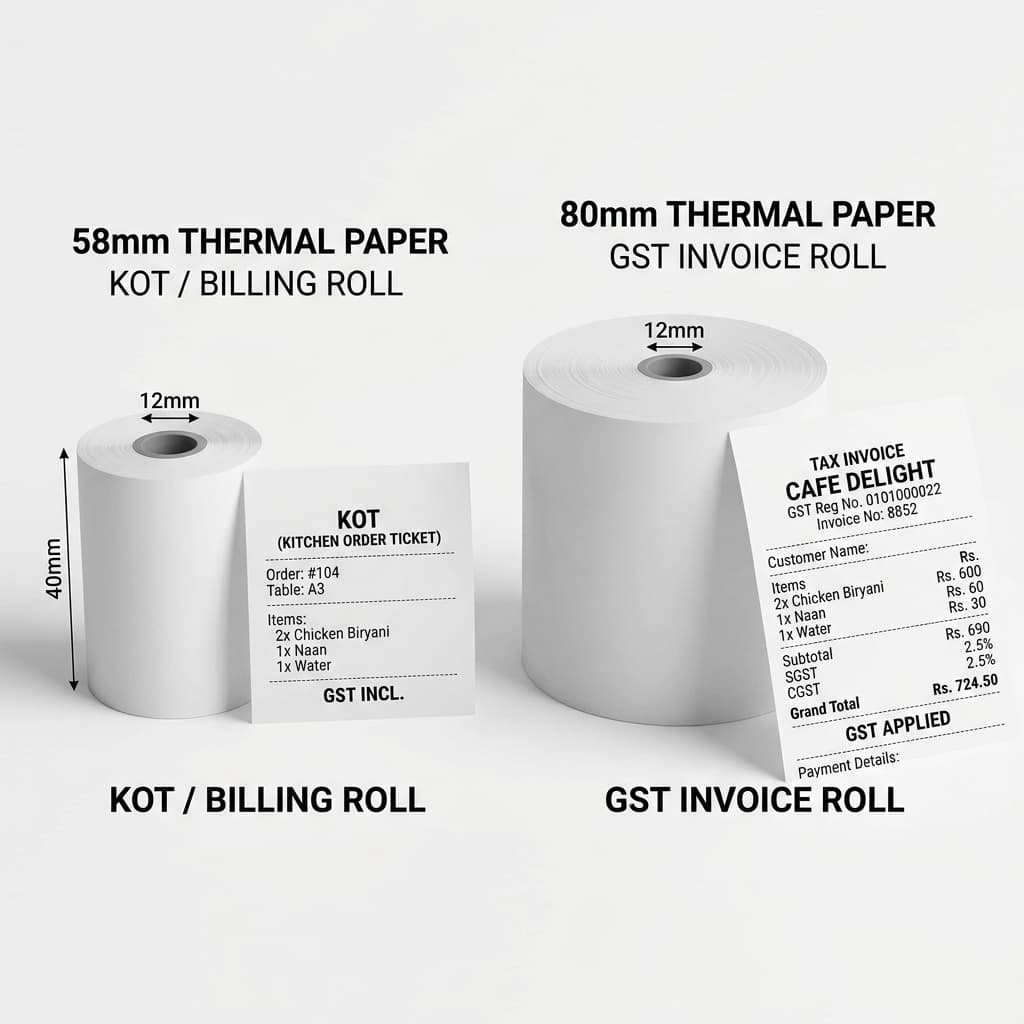
80mm paper rolls support full GST bill format with CGST, SGST, and itemized details.
Most restaurants in Chhattisgarh use one of two standard paper roll sizes:
| Paper Width | Used For | Content Width |
|---|---|---|
| 58mm | Compact counters, small receipts | ~32 characters per line |
| 80mm | Standard restaurant bills, KOT slips | ~48 characters per line |
How to set paper size in Windows:
- Open `Devices and Printers`
- Right-click your thermal printer → `Printer Properties`
- Go to `Advanced → Printing Defaults`
- Set paper size to `58mm` or `80mm` as required
- Save and apply
Step 4: Print a Test Receipt
Before going live, always print a test receipt to verify:
- ✅ Paper feeds correctly
- ✅ Text is sharp and readable
- ✅ Paper cuts cleanly (if your printer has auto-cut)
- ✅ The alignment is centered
How to print a test receipt:
- Hold the Feed button while turning on the printer
- The printer prints a self-test slip with model info and settings
- Confirm the paper width and DPI match your configuration
Step 5: Connect Thermal Printer With RestroKhata POS
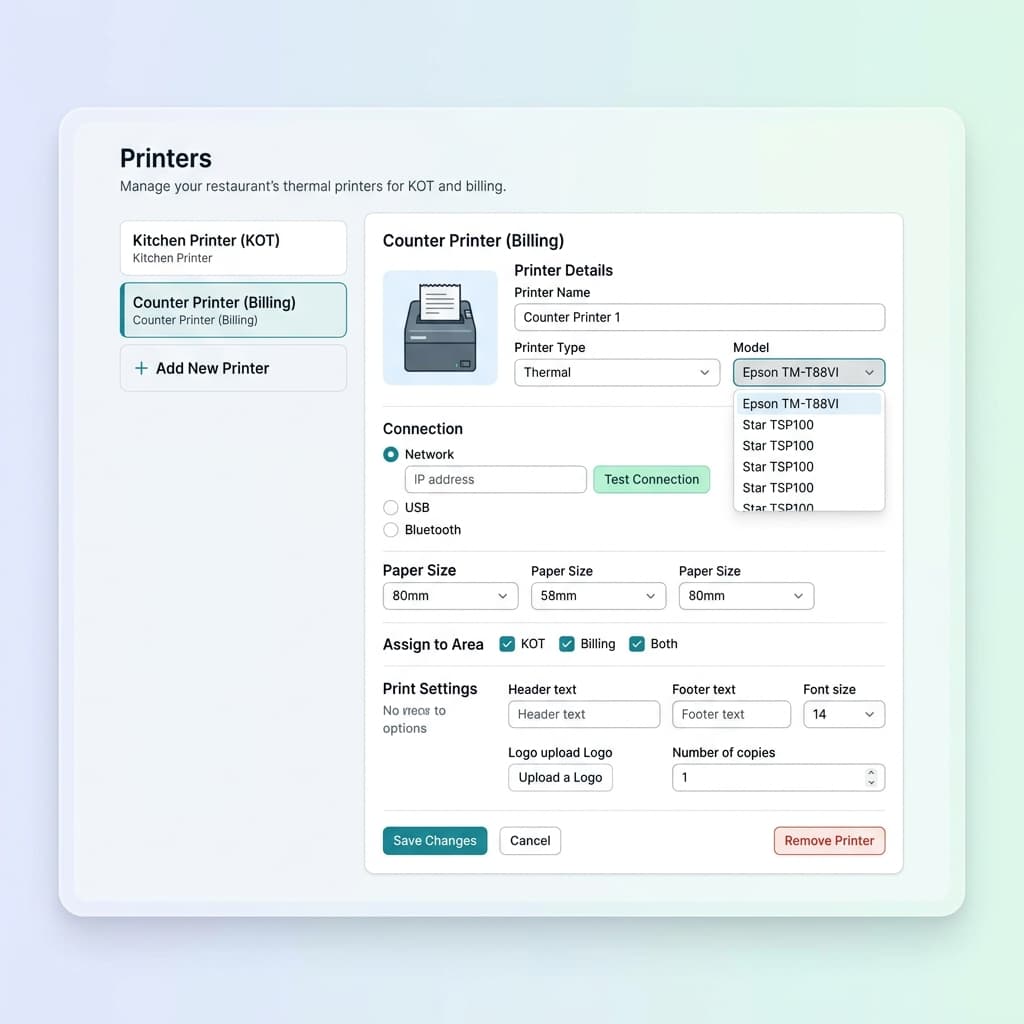
In RestroKhata, adding a thermal printer takes less than 2 minutes from the Settings panel.
This is where most restaurant owners get stuck. Here's the exact process for RestroKhata:
- Open RestroKhata on your billing device
- Go to Settings → Printer Settings
- Click Add Printer
- Select connection type: USB / LAN / WiFi / Bluetooth
- For LAN/WiFi: Enter the printer's IP address
- Set paper width: 58mm or 80mm
- Select print profiles:
- Counter bill → Customer receipt printer
- KOT → Kitchen printer
- Click Test Print to verify
- Save settings
RestroKhata Tip: If your restaurant has a separate kitchen counter and billing counter, you can configure two printers in RestroKhata — one for KOT slips in the kitchen and one for GST bills at the billing desk.
Recommended Restaurant Printing Workflow
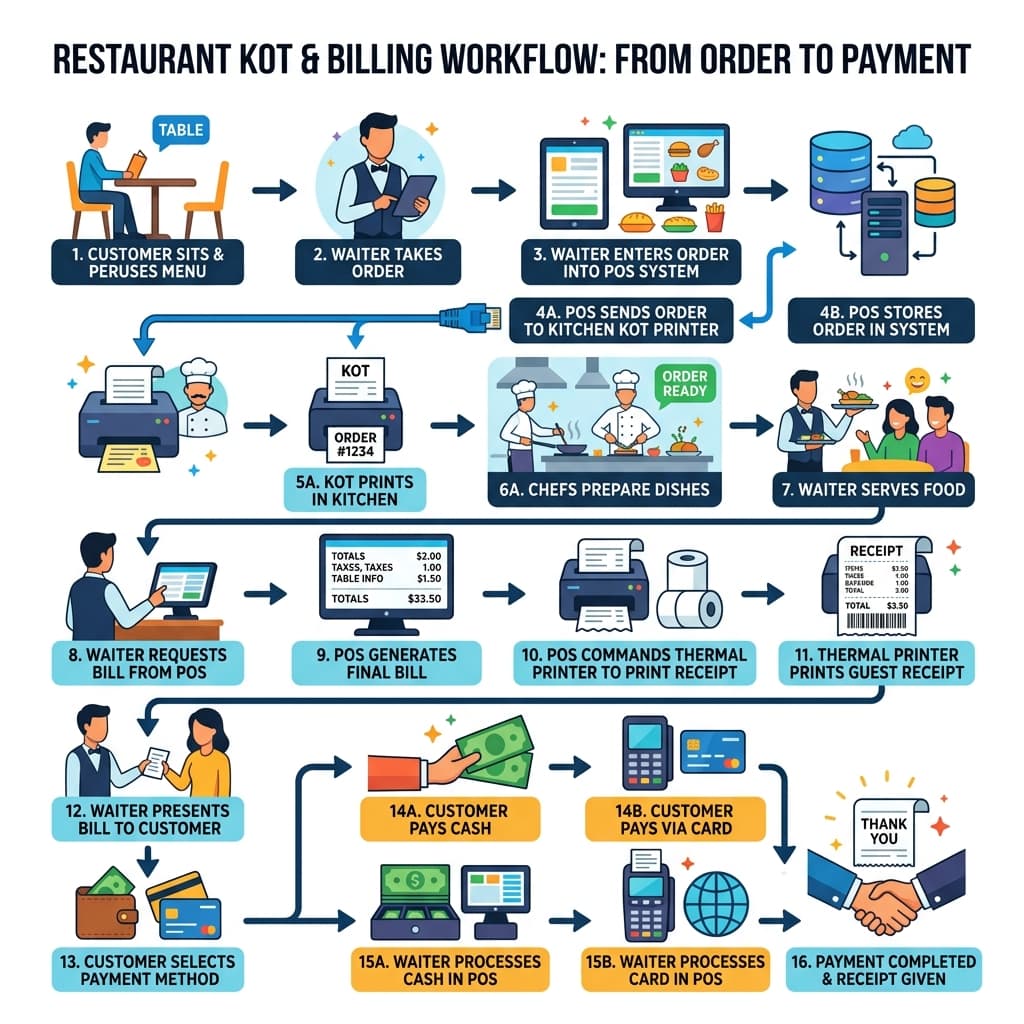
RestroKhata automatically sends KOT to kitchen and GST bill to billing counter — no manual steps needed.
This workflow is already being used by cafes and restaurants in Raipur, Bhilai, and Durg that use RestroKhata — and it cuts average billing time by more than half.
GST Bill Format on Thermal Printer
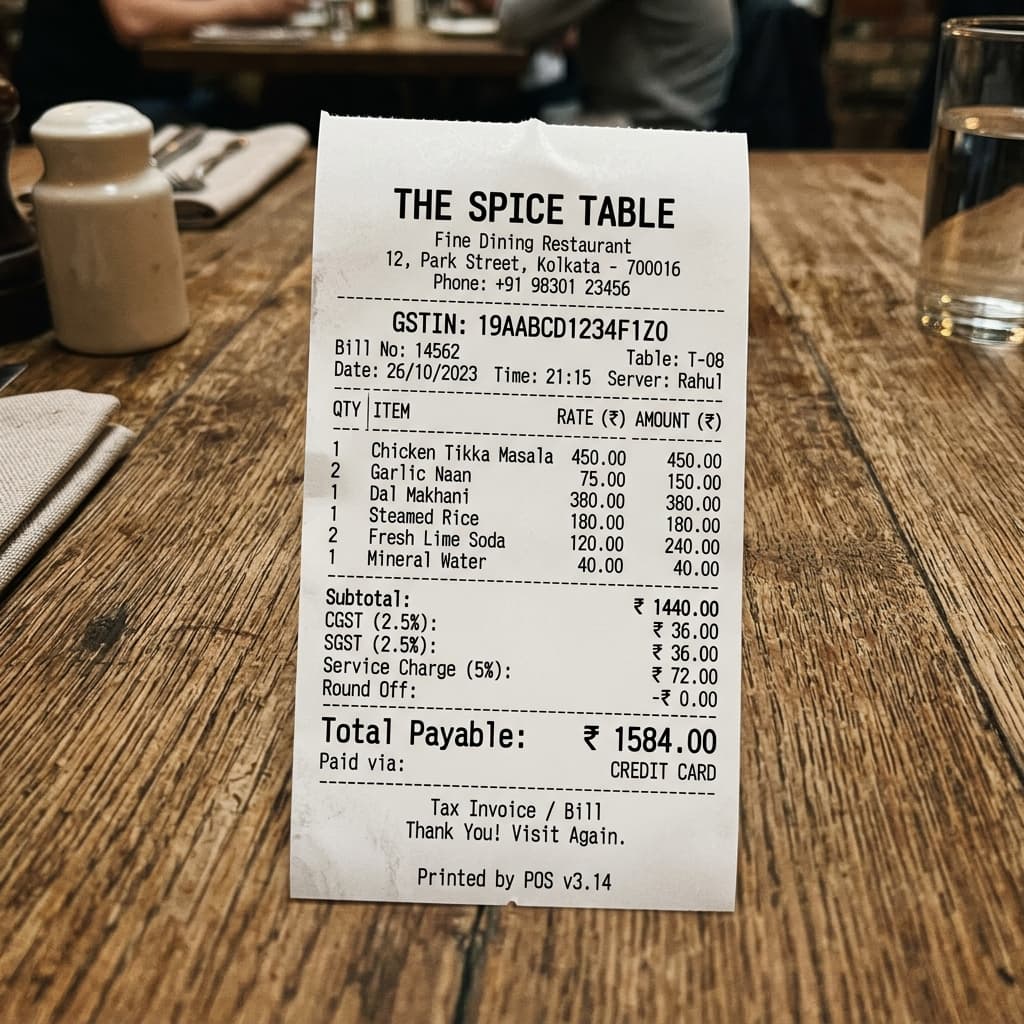
RestroKhata generates GST-compliant bills with CGST, SGST, GSTIN, and UPI QR code automatically.
For restaurants registered under GST in Chhattisgarh (GSTIN with state code 22), your thermal bill must include:
| Required Field | Example |
|---|---|
| Restaurant Name | Sharma Dhaba |
| GSTIN | 22AABCS1429B1ZB |
| Address | Near Bus Stand, Durg, CG |
| Bill Number | INV-2026-00847 |
| Date & Time | 23 Jun 2026, 1:15 PM |
| Item Name + Qty + Rate | Paneer Tikka × 2 = ₹320 |
| CGST / SGST (2.5% each) | CGST: ₹8, SGST: ₹8 |
| Total Amount | ₹336 |
| Payment Mode | UPI – Paid |
RestroKhata automatically generates all of the above in the correct GST format when you set up your business profile.
Troubleshooting: Thermal Printer Issues in Restaurant POS
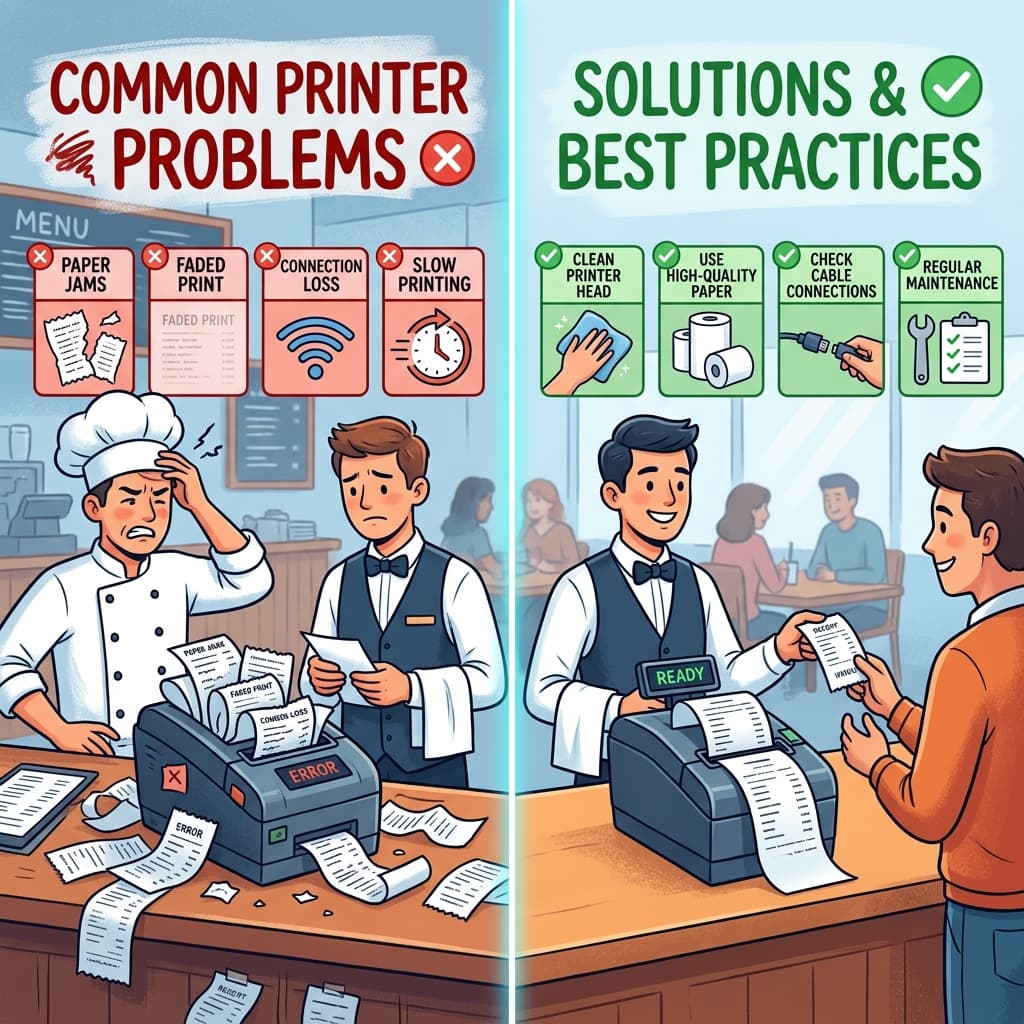
Most thermal printer issues are solved in under 2 minutes with the right fix.
Issue: Printer Shows "Offline" in Windows
Fix:
- Right-click printer → `See what's printing`
- Click `Printer` menu → uncheck `Use Printer Offline`
- Restart the print spooler: `services.msc → Print Spooler → Restart`
Issue: KOT Not Printing in Kitchen
Fix:
- Verify the kitchen printer's IP address hasn't changed (assign static IP in router)
- In RestroKhata → Settings → Printer Settings → re-enter the kitchen printer IP
- Test print from settings
Issue: Blank Receipts / Faded Print
Fix:
- Paper is loaded upside down — thermal paper only prints on the coated side
- Flip the paper roll so the smooth/shiny side faces the print head
Issue: Bill Printing Two Times
Fix:
- Disable duplicate print mode in RestroKhata settings
- Check if printer is added twice under different names in POS
Issue: Paper Jam Every Hour
Fix:
- Use branded 80mm thermal paper rolls — cheap rolls cause frequent jams
- Clean the paper feed sensor with a dry cloth weekly
Why Restaurants in Chhattisgarh Are Upgrading to Digital POS + Thermal Printing
Across Raipur, Bhilai, Durg, Rajnandgaon, Korba, and Jagdalpur, restaurant owners are rapidly moving away from:
- Manual order pads and handwritten KOT slips
- Cash register billing machines
- Basic billing apps without KOT support
And moving toward:
- Cloud POS with automatic KOT printing
- GST-compliant billing in one click
- Real-time sales reports on mobile
- UPI and card payment integration
The reason is simple: A small cafe in Raipur with 15 tables that handles 80–100 covers a day cannot afford billing delays or KOT errors. With a thermal printer connected to RestroKhata, the kitchen gets the order the same second it's placed — no shouting, no confusion.
Frequently Asked Questions
Which thermal printer is best for a small cafe in Raipur?
For a small cafe with 1 billing counter, a USB thermal printer like Xprinter XP-58 or TVS RP3200 is ideal. It costs ₹2,000–₹4,000 and works directly with RestroKhata.
Can I use one printer for both KOT and billing?
Yes, you can use one printer for both if your restaurant is small and your kitchen is near the counter. RestroKhata allows you to send both KOT and bill to the same printer.
Does RestroKhata support WiFi thermal printers?
Yes. RestroKhata supports USB, LAN, WiFi, and Bluetooth thermal printers. Enter the printer IP address in the printer settings section.
What paper size should I use for restaurant bills in Chhattisgarh?
80mm paper rolls are standard for restaurant GST bills. 58mm rolls are used for compact counters or quick-service outlets with shorter bill formats.
How do I print KOT slips for my kitchen in RestroKhata?
Go to Settings → Printer Settings in RestroKhata → Add a second printer for the kitchen → map it as the KOT printer. Every new order placed in POS will automatically print a KOT slip at the kitchen counter.
Is thermal printer setup difficult for someone with no technical knowledge?
No. For USB printers, it takes less than 10 minutes. LAN and WiFi printers take 15–20 minutes. This guide covers every step without technical jargon.
What is the cost of a thermal printer for a restaurant in Chhattisgarh?
USB printers start at ₹1,800. LAN/WiFi printers range from ₹4,000 to ₹10,000. A reliable mid-range 80mm LAN thermal printer costs around ₹5,000–₹6,500.
Conclusion: Your Restaurant Deserves Faster Billing
Whether you run a cafe in Raipur, a multi-cuisine restaurant in Bhilai, or a dhaba on the Durg-Raipur highway — your customers don't like to wait for bills, and your kitchen staff can't afford to miss orders.
A thermal printer connected to RestroKhata takes care of both.
- KOT slips print automatically the moment an order is placed
- GST bills generate in one click
- No handwriting, no duplicate slips, no billing errors
- Sales data is captured automatically for your daily reports
Setting up a thermal printer with RestroKhata takes less than 15 minutes and can transform how your restaurant operates.
Set Up Your Restaurant Printer With RestroKhata Today
RestroKhata is built for small and mid-size cafes and restaurants across Chhattisgarh. It supports all major thermal printer brands, generates GST-compliant bills automatically, and manages KOT printing for your kitchen — all from one simple dashboard.
Start Free Trial →